New in Vythos: What the AI Did for Each Client
Every job Claude does for a client now lands on that client's page, with the rules it was given and what the check found. Download it and send it.
Sooner or later a client asks it: "Did your AI actually follow our brand rules on this?"
Until this week, the honest answer was "I think so". You knew Claude had the rules. You couldn't show it.
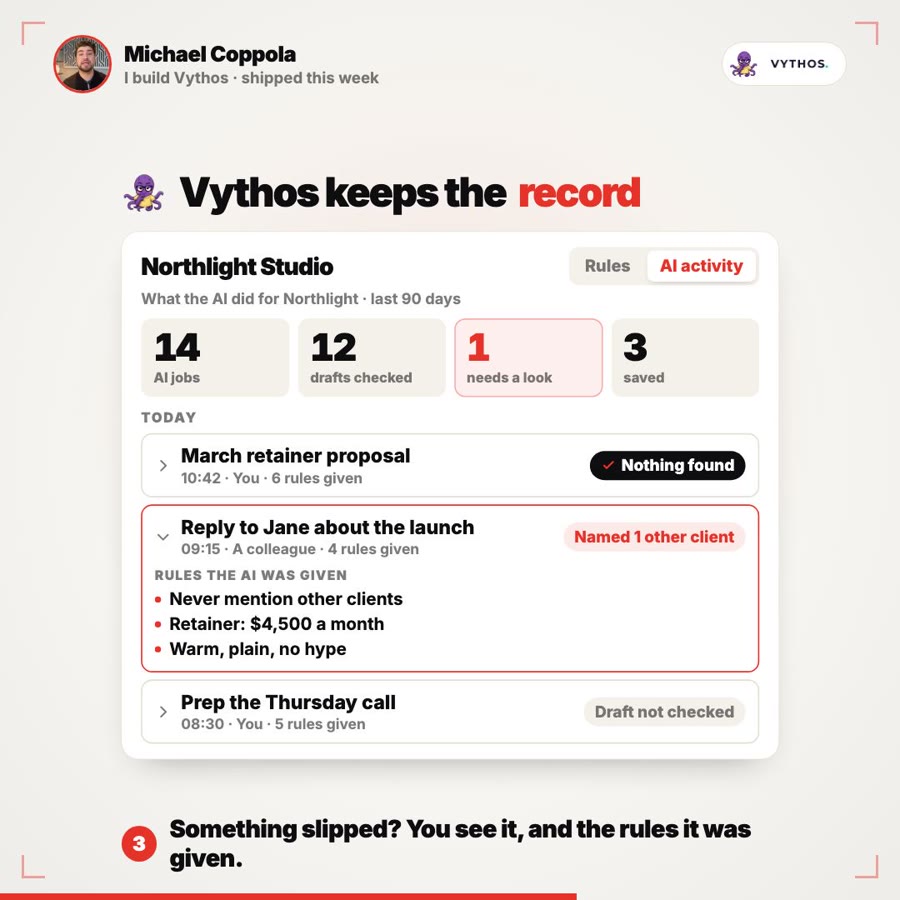
Now you can. Every client in your Playbook has a new tab, AI activity: each job an AI tool did for that client through Vythos, the rules it was given, and what the draft check found.
What the tab shows
Open a client in the Playbook and pick AI activity, next to Rules. It covers the last 90 days.
Four numbers come first: AI jobs, drafts checked, jobs that need a look, and things saved. Click need a look and you see only those jobs.
Then every job, under its day. Each one says when it ran, whether it was you or a colleague, and how many rules the tool was given. Open a job to see the rules themselves.
Next to each job is what the draft check found:
- Nothing found: the draft matched what the AI was given
- 1 rule broken: the draft went against a rule it was given. Open the job to see those rules
- 1 figure to look at: a number that doesn't match what the AI was given, or is out of date
- Named 1 other client: another client's name made it into the draft
- Draft not checked: the check never ran, and the record says so instead of looking clean
Under the jobs is what was saved for the client, rules and facts, including the ones Claude suggested and you approved.
Send it to the client
Download gives you the same record as a Markdown file: the rules each job was given, what the check found, and what was saved for the client. It leaves out everyone's tasks and reasons, so it's made to be shared. Read it before you send it, as you would anything that goes to a client.
That's the point of the feature. "We use AI, and we're careful with it" is a promise. A list of the rules the AI followed for them, including the one time it slipped and you caught it, is proof.
Claude does the work. Vythos keeps the record.
Two prompts that run the method for you
A record is only as good as the habit behind it, so this week also brought two ready-made prompts. In Claude, open the + or / menu and pick one:
- Write with my Playbook loads the client's rules, writes, checks the draft, fixes what the check found, and shows you the result.
- Prep a client meeting brings the client's rules and their last 90 days of calls and threads together into a brief, with sources.
Nobody has to remember to check. Every job either prompt runs shows up on the client's AI activity tab with its check.
Who sees what
- Owners, and leads who work on that client. Everyone else sees the Rules tab, as before.
- Only rules you're allowed to read. The broken-rule count covers only those, so it can't give away a rule you can't see.
- Nobody is named. A job is "You" or "A colleague", and a colleague's task never shows.
- The drafts aren't stored. Vythos keeps what the check found, not what the AI wrote.
- Ask stays out. Questions asked in Vythos's own Ask don't appear here.
The honest limit
It records what goes through Vythos. If someone pastes a brief into a chat that isn't connected, there's nothing to record.
And a check only knows your rules. If a rule is wrong, the record will faithfully show the AI following the wrong rule. The fix is in one place: change the rule in the Playbook, and every job after that gets the new one.
The one thing
When a client asks whether the AI followed their rules, the answer shouldn't be "trust us". Now it's a file you can send them.